A ten-minute read for anyone who wants to know more about data sanitization. The information is based on the US National Institute of Standards and Technology's NIST 800-88, 800-60 and FIPS 199 publications.
Several methods can be used to sanitize storage media. The general flow is to categorize the information to be disposed of, assess the medium it is recorded on and the risk to confidentiality, and then choose the appropriate sanitization method. The method should be weighed for cost, environmental impact and so on, choosing the option that best reduces the risk of unauthorized disclosure.
1. Classification of information and systems
The first step of proper data sanitization is to classify and categorize the information, and the systems hosting it, correctly. FIPS PUB 199 is a good place to start. Ideally, this happens early in the system life cycle.
Security categories are based on the potential impact on an organization if events jeopardize the information and systems it needs to accomplish its mission, protect its assets, meet its legal responsibilities, maintain its day-to-day functions and protect individuals. They are used together with vulnerability and threat information to assess risk.
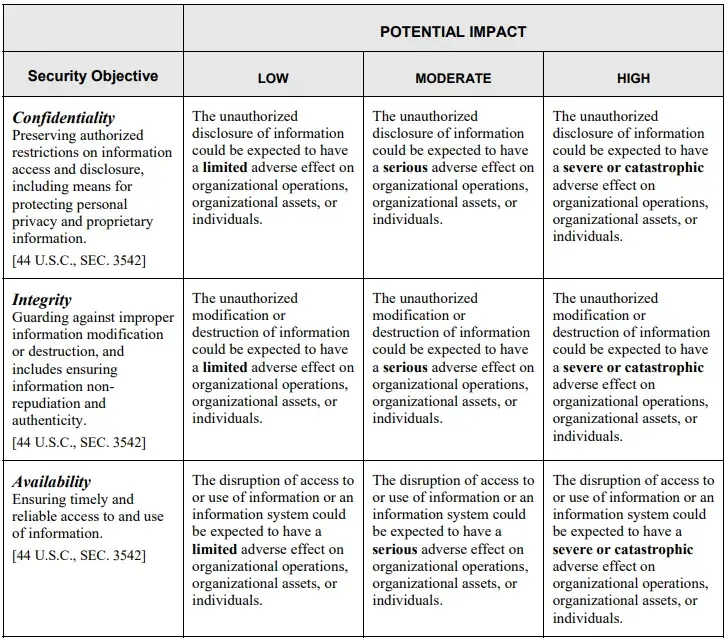
There are three security objectives for information and information systems:
- Confidentiality: "Preserving authorized restrictions on information access and disclosure, including means for protecting personal privacy and proprietary information." A loss of confidentiality is the unauthorized disclosure of information.
- Integrity: "Guarding against improper information modification or destruction, and includes ensuring information non-repudiation and authenticity." A loss of integrity is the unauthorized modification or destruction of information.
- Availability: "Ensuring timely and reliable access to and use of information." A loss of availability is the disruption of access to or use of information or an information system.
To categorize an information type or system (see Figure 1), take the highest impact level across confidentiality, integrity and availability. Information is categorized by its information type: a specific category of information (for example privacy, medical, proprietary, financial, investigative, contractor sensitive or security management) defined by an organization or, in some cases, by a law, executive order, directive, policy or regulation.
Security category of an information type = {(confidentiality, impact), (integrity, impact), (availability, impact)}, where impact is LOW, MODERATE, HIGH or NOT APPLICABLE.
Security category of an information system = the same, where impact is LOW, MODERATE or HIGH.
For example:
- An administrative computer used for booking meeting rooms would probably have low potential impact on confidentiality, integrity and availability, and need only a basic Clear by overwrite and/or Secure Erase.
- At the other extreme, a server hosting an organization's Enterprise Resource Planning system would need thorough sanitization involving shredding.
2. Choosing the appropriate methods for sanitization
There are many types of storage media and information storage systems, and different equipment needs different sanitization and verification methods. Weigh each method for cost, environmental impact and so on, and choose the one that best reduces the risk of unauthorized disclosure.
Clear
Overwrite user-addressable storage space on the media with non-sensitive data.
Purge
Dedicated, standardized device sanitize commands that apply media-specific techniques; degaussing; destruction.
Destroy
Completely destroy the media.
Clear
One way to sanitize media is to use software or hardware products to overwrite user-addressable storage space with non-sensitive data, using the device's standard read and write commands. This should cover not only the logical storage location of a file (for example the file allocation table) but all user-addressable locations. The goal is to replace target data with non-sensitive data.
Overwriting cannot be used on media that are damaged or not rewritable, and may not reach every area where sensitive data is retained. Media type and size also matter. For example, flash-based storage may contain spare cells and perform wear levelling, so a user may not be able to address, and therefore overwrite, every area where data has been stored.
Clear may work differently on devices other than dedicated storage, such as a basic mobile phone or office equipment, which may only offer a reset to factory state (typically by deleting file pointers). Where rewriting is not supported, manufacturer resets may be the only way to Clear the device. These still meet the definition of Clear as long as the device interface available to the user does not allow the cleared data to be retrieved.
Purge
Purge methods, which vary by media and must be applied as described in NIST 800-88, include overwrite, block erase and Cryptographic Erase, using dedicated, standardized device sanitize commands that bypass the abstraction of normal read and write commands.
Destructive techniques also purge a device when applied to the right media type, including incineration, shredding, disintegrating, degaussing and pulverizing. All of them make recovery infeasible even with state-of-the-art laboratory techniques. However, bending, cutting and some emergency procedures may only damage the media, leaving portions that advanced laboratory techniques can still read.
Degaussing purges legacy magnetic media when the degausser's strength is matched to the media's coercivity, which can be hard to judge from the label alone, so check with the device manufacturer. Degaussing should never be relied on alone for flash-based storage, or for magnetic storage that also contains non-volatile, non-magnetic storage. It makes many devices unusable, in which case it is also a destruction technique.
Destroy
There are many types, techniques and procedures for destroying media. Some make target data infeasible to retrieve through the device interface, but a device only counts as destroyed when retrieval is infeasible even with state-of-the-art laboratory techniques.
- Disintegrate, pulverize, melt and incinerate. Designed to destroy the media completely. Usually carried out at an outsourced metal destruction or licensed incineration facility.
- Shred. Paper shredders can destroy flexible media such as diskettes once removed from their outer containers. The particle size should be small enough to give reasonable assurance, in proportion to the data's confidentiality, that it cannot be reconstructed. Mixing shredded material with non-sensitive material of the same type makes reconstruction even harder.
Destruction may be the only option when the media has failed and Clear or Purge cannot be applied, or when verification of Clear or Purge fails for known or unknown reasons.
Databyte Solution offers organizations the following sanitization methods:
- Secure Erase: an overwrite command in the ATA standard ("Security Erase Unit") that uses a firmware-based process to overwrite the media, by overwrite or Cryptographic Erase depending on the manufacturer.
- Overwrite: writing one or more patterns of data over the physical location of stored data to prevent recovery.
- Cryptographic Erase (CE): the media encryption key (MEK) for the encrypted target data is sanitized, making recovery of the decrypted data infeasible.
- Degaussing: reducing magnetic flux to virtually zero by applying a reverse magnetizing field. Degaussing any current-generation hard disk (including IDE, EIDE, ATA and SCSI) makes it permanently unusable, as these drives store track location information on the disk.
- Crushing / bending: bending the storage medium to damage it, usually performed onsite so witnesses can verify physical destruction.
- Shredding / disintegration: breaking storage media and material into many small particles.
3. Selecting the appropriate vendors and equipment
Vendors who can work to the organization's requirements give assurance of systematic sanitization to certified standards. Experienced vendors can advise on details such as how sector sizing and the SCSI interface affect the use of overwriting or Secure Erase commands.
A suitable vendor provides the right equipment and methodology, and recommends the appropriate sanitization method for your organization's information and systems. Contact Databyte Solution for a no-obligation chat and a quotation.
Equipment
Where results cannot easily be verified (a degaussed hard drive looks identical to a normal one), use products evaluated by NSA/CSS. Visible results such as physical destruction by shredding speak for themselves.
4. Proper record keeping
Keeping sanitization records with the key fields recommended by NIST 800-88 Rev 1 lets organizations properly account for sanitization and disposal activities.
Media information
- Manufacturer / vendor
- Serial number
- Model
- Organization / media property number
- Media type
- Media source
- Classification
- Data status
Sanitization details
- Sanitization description (Clear, Purge or Destroy)
- Method used
- Tool used
- Verification method
- Post-sanitization classification
- Media destination
5. Conclusion
Different organizations hold different information and systems that need different end-of-life sanitization. Knowing what data is stored on a device lets you apply the technique that best balances efficiency and efficacy while keeping data confidential.
- Classify your information's importance against confidentiality, integrity and availability, ideally early in the system life cycle.
- Select sanitization methods that match the security category of the confidentiality of the information on the media. The decision rests on the confidentiality of the information, not the type of media; the media type then determines the technique used to reach that goal.
- Engage a reputable, certified vendor or contractor, or buy evaluated equipment that meets sanitization requirements.
- Record the whole process properly.